
 QED
QEDEntities
Non-character things - items, factions - tracked across the story by gain, loss, shift, reveal.
Entities
A tab of the Threads rail - the same grid as Character Arcs, but for non-character things: items, factions, and the like. Each row is a tracked thing; columns are scenes; bands group by chapter, and a band's dots are that chapter's changes, colored by direction.
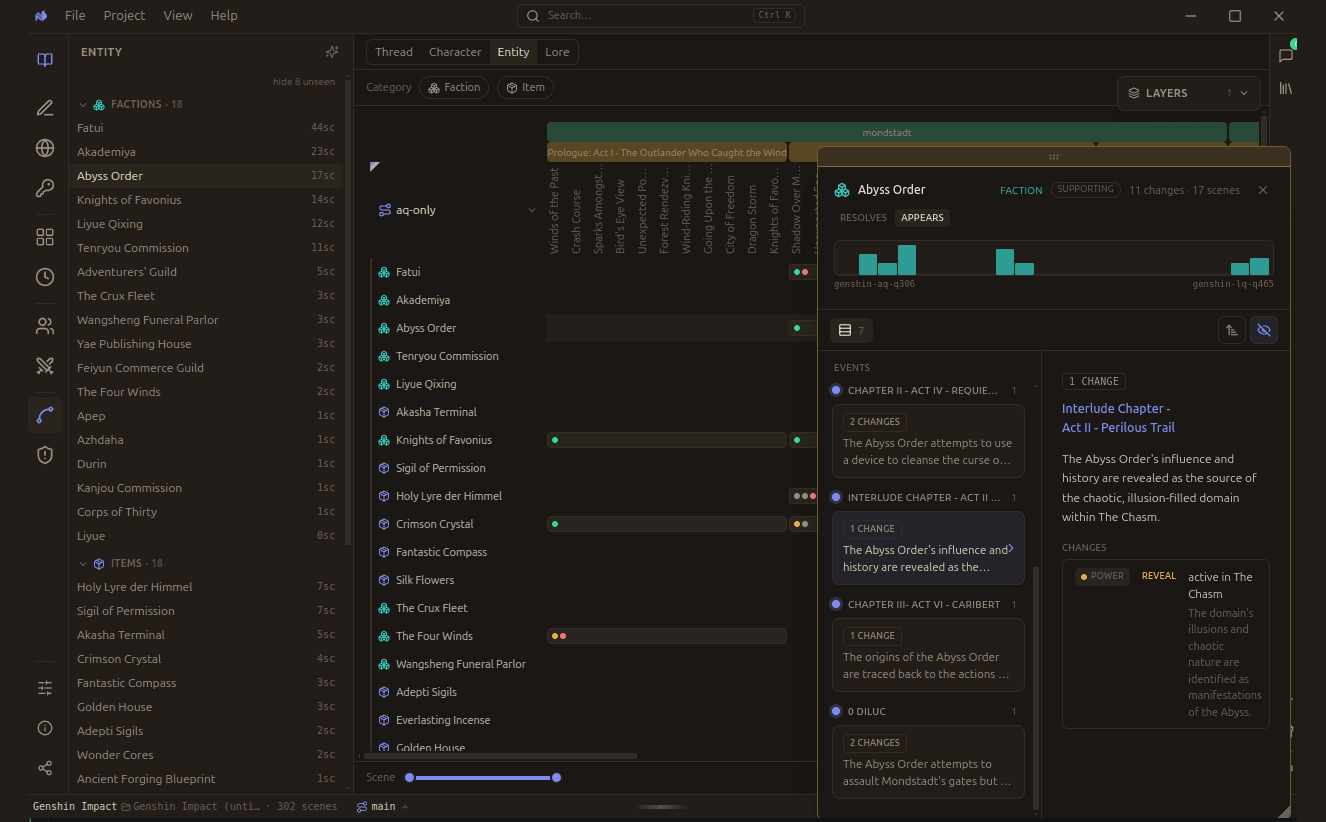
Entities are counted by the scenes they appear in, so the sidebar doubles as a ranking of what actually carries weight.
Counted, then ranked
Every entity carries a scene count, which is the whole point of the view. An item you believed was central but which appears in three scenes is telling you something before you read a word.
Entities split by category, filtered from the chips above the chart:
| Category | Examples in a story |
|---|---|
| Faction | Orders, guilds, houses, companies |
| Item | The objects the plot turns on |
Selecting one opens a float with its role, its change count, and the scenes it spans. An entity that appears widely but never changes is scenery; one that changes often is doing plot work.
An item that changes hands belongs in Custody as well. This rail tells you an item matters; custody tells you who was holding it and when.
How it moved (every change is one of four)
| ● gain | it strengthens / is acquired / rises |
| ● loss | it weakens / is destroyed / falls |
| ● shift | a lateral move - changes hands, is altered, realigns |
| ● reveal | it becomes known - exposed or discovered |
What's tracked
Facets are per category - an item moves along custody · state · location · function; a faction along power · standing · allegiance · territory. Only arc-worthy things get a journey: it has a world page, recurs across scenes, or the analysis flagged it major.