
 QED
QEDScene panel
The editor: story tree, tabs, the writing surface, and the three ways to view a scene.
Scene panel
Where you actually write. Everything else in NVS reads what happens here.
This page covers the panel. For what belongs in a scene and how the blocks work, see Scene and Writing blocks.
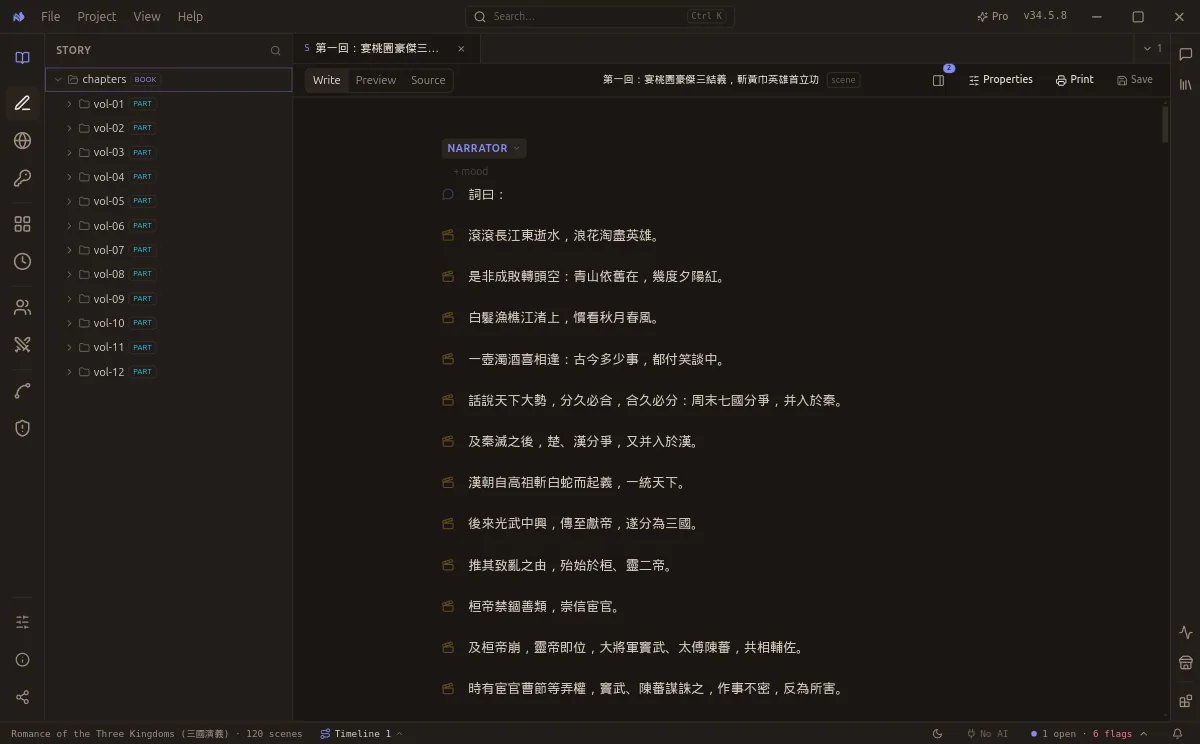
Romance of the Three Kingdoms open in the editor. Every beat is a block, not free text.
The four parts
| Part | What it is |
|---|---|
| Story tree | Your chapters and scenes, in reading order. The left sidebar |
| Tab strip | Open pages, with a dot on any that has unsaved changes |
| Writing surface | The scene itself, one block per beat |
| Inspector | What the engine understood, in a column beside the prose |
The Inspector is worth opening early. It is the fastest way to see whether what you wrote landed the way you meant.
Three views of the same scene
A scene toolbar offers three tabs, and they are the same file seen three ways.
| Tab | Shows | Use it to |
|---|---|---|
| Write | The block editor | Compose. Each beat is a labelled block |
| Preview | The scene as a reader meets it | Check flow and rhythm |
| Source | The raw Fountain text | Paste, bulk-edit, or check exactly what is on disk |
Source is the honest one: it is literally the file. If you ever doubt what NVS has written, read it there.
Properties
Beside the view tabs sits Properties, which holds the scene's own metadata rather than its prose: its phase, its title, and the handful of declared facts that belong to the scene itself.
Phase matters more than it looks. Analysis reads canon pages, so a scene left at draft may be skipped. If a scene's Inspector is blank, check its phase first.
Where to go next
- Writing blocks for speech, action, narration, and cuts
- Shortcuts for the keys worth learning
- Cheatsheet for the whole format on one screen