
 QED
QEDScene format
The NVS Fountain dialect - how to write speech, inner thought, narration, action, and transitions.
Scene format
NVS scenes are plain text written in a constrained subset of Fountain - the screenplay format used by Final Draft and Highland. Every line has an unambiguous shape; no heuristics, no special tokens. What you type in the Source view round-trips with the block editor.
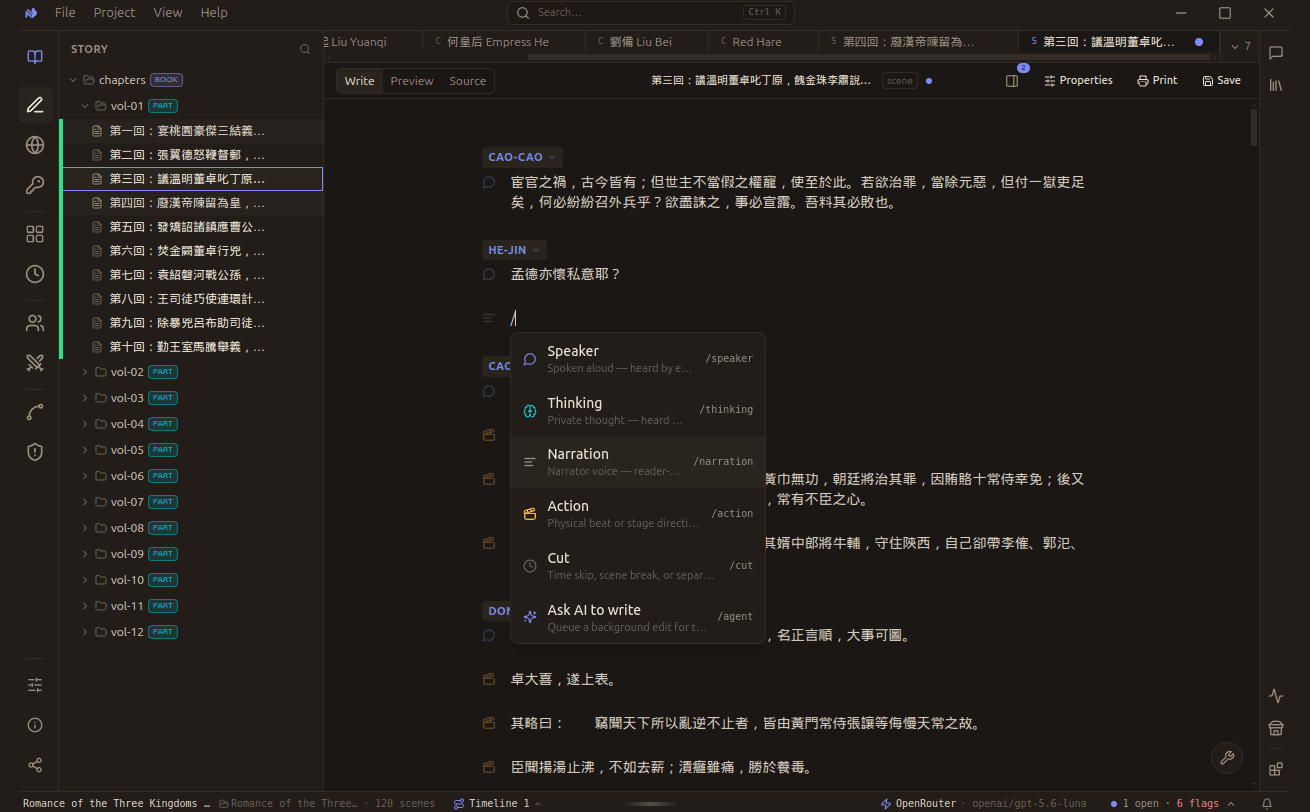
Type / anywhere in a scene to open the palette. Each block type has a command, so you can stay on the keyboard.
Which block do I want?
Two questions settle almost every case, and both are about who can hear it.
The palette
You never have to remember Fountain syntax. Typing / mid-scene opens the palette, and each entry inserts
the right block.
| Command | Block | What it is |
|---|---|---|
/speaker | Speaker | Spoken aloud, heard by everyone present |
/thinking | Thinking | Private thought, heard by nobody |
/narration | Narration | Narrator voice, addressed to the reader |
/action | Action | A physical beat or stage direction |
/cut | Cut | A time skip, scene break, or separator |
/agent | Ask AI to write | Queues a background edit for you to review |
The speech and thinking split is not cosmetic. It is how the engine knows what other characters could have heard, which is what makes custody able to say who knows what.
The block types
| You write | Block type | Heard by |
|---|---|---|
ALL CAPS line (+ optional (mood)) | Speech - spoken dialogue | Everyone present |
ALL CAPS (THINKING) | Thinking - inner monologue | No one (private) |
plain paragraph | Narration - narrator voice | The reader only |
> line | Action - physical stage beat | The reader only |
= line | Transition - scene break / time cut | N/A |
Chorus (ALL, BOTH, A AND B) is discouraged: you can write a group cue, but the engine treats it
as invisible - no speaker, no presence, no knowledge. Prefer attributing individual lines. Use = for a
scene break; a bare --- isn't a separator (it's the frontmatter delimiter).
The distinction matters: a character who says something makes it public - everyone in the room can act on it later. A character who thinks something keeps it private - only they know, and the engine treats contradictions between private plans and public speech as deliberate deception, not incoherence.
A complete example
The harbour office was already dark when Mara arrived.

MARA
You knew the shipment was short before it left.

DELACROIX (THINKING)
She's been counting this whole time.

DELACROIX
The tides were against us. There's nothing to be done.

> Mara places a ledger on the table without looking up.

MARA
Sign it anyway.

= Three weeks earlier.

The numbers had looked fine then.
The engine reads this as: one narration beat; one speech exchange; one private thought; one speech reply; one action beat; one transition; one closing narration.
Thinking variants
Any of these parentheticals mark inner thought - they are equivalent and case-insensitive:
(THINKING) (THINKS) (THOUGHT) (INTERNAL) (MONOLOGUE) - case-insensitive.
The parenthetical is stripped from the stored speaker name; MARA (THINKING) and MARA are the
same character. (Dotted variants like (V.O.) / (O.S.) aren't recognised as cues - skip them.)
Mood
A speech cue can carry a mood - the speaker's emotional state, in parentheses:
MARA (angry)
Sign it anyway.
Mood is a small fixed set, like a visual-novel expression tag: happy · sad · angry · surprised · worried · smug · serious · shy · excited · scared. No parenthetical means neutral. (Thinking cues don't take a mood - their parenthetical is the thinking marker; one parenthetical per cue.)
Mood chips are shown in the Write view only when Settings Show mood tags is on; either way the
(mood) stays in your prose and in Source.
Timing
Any beat - speech, narration, action - can carry a timing tag: a start (and optional end) timecode in
square brackets at the front of the beat's first line. This is for subtitle, caption, and transcript work
(an .srt imports straight into NVS with its timing intact).
[00:00:01.000 00:00:04.200] MARA
You knew the shipment was short before it left.

[00:00:07.300 00:00:09.800] Rain streaked the harbour glass.

[00:00:10.000] MARA
Sign it anyway.- Format is
HH:MM:SS.mmmorMM:SS.mmm. The separator accepts, `-->` (SRT), `–`, or `-`; NVS writes. - The end is optional -
[00:00:10.000]is a legal start-only tag. - Timing is metadata: it records when, and never changes who-hears-what or the analysis.
Timing chips are shown in the Write view only when Settings Show timing tags is on (off by default); the timecodes always remain in your prose and in Source.
Importing subtitles: drop an .srt in - each cue becomes a beat carrying its timecodes. A NAME: text cue
line becomes that speaker's dialogue; a bare caption becomes narration.
Inline formatting
Bold and italic work inside any block:
| Syntax | Result |
|---|---|
**text** | bold |
*text* | italic |
***text*** | bold italic |
Slash palette
Type / inside a block to convert it:
| Command | Block |
|---|---|
/sp | Speech |
/th | Thinking |
/na | Narration |
/ac | Action |
/tr | Transition |
@name | Convert to speech and set the speaker |
The full format specification - linter rules, every block, what's explicitly unsupported, and the
accept rules (what a reader tolerates and normalises) - lives in
nvs-parser/references/nvs-format.md.