
 QED
QEDCorkboard
A freeform index-card canvas: note cards, connections, and boards for planning by hand.
Corkboard
A freeform index-card surface for the thinking you do before the writing. Place cards, connect them, group them, and keep as many boards as the story needs.
Authored. Arranged entirely by hand, with nothing derived. Nothing here is read from analysis, because none of it exists in your manuscript yet.
The story tree holds what you have written. The Timeline holds the order those scenes are read in. Neither has anywhere to put the idea you had in the shower.
The Corkboard is that place. It is the one surface in NVS with no obligation to correspond to your draft, which is exactly what makes it useful: you can put a card down for a scene that does not exist, an ending you have not committed to, or a character who is still just a job description.
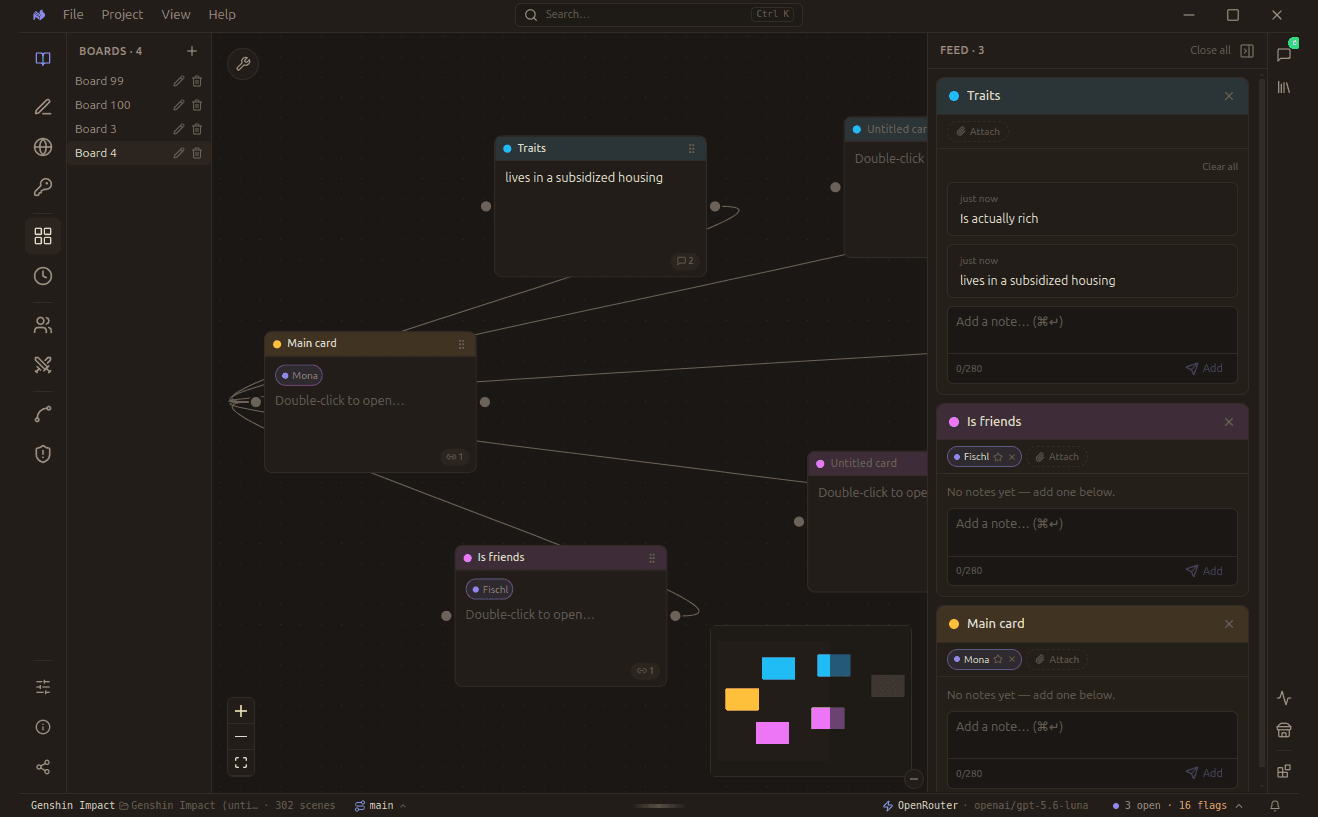
Cards carry a title, any number of notes, and optional character chips. The feed on the right collects the notes attached to whichever cards you have open.
Which surface do I want?
The three planning surfaces answer different questions. Picking the wrong one is the usual reason planning feels like busywork.
Add and edit
Cards are deliberately small. A note caps at 280 characters, which is enough for an idea and not enough for a draft, so the board stays scannable.
| Do this | What happens |
|---|---|
| Right-click the board | Adds a note card where you clicked |
| Drag the header grip | Moves the card |
| Drag a corner | Resizes the card |
| Type in a card | Writes the note, up to 280 characters |
| Hover, then click × | Deletes the card |
Connect
Connections here carry no reading-order meaning. They are associations: this causes that, this pays off that, these three belong together.
| Do this | What happens |
|---|---|
| Right dot, then a card | Draws a connection. Release anywhere on the target card |
| Select a group, then Connect all to | Links every selected card to one target, many to one |
Select a group
| Do this | What happens |
|---|---|
| drag | Draws a selection box. Any card the box touches is picked up |
| Group float, top right | Offers Connect all to, Set group color, and Delete |
| Backspace or Delete | Removes the whole selection |
Boards
| Detail | Value |
|---|---|
| Switch, rename, or delete | The left sidebar |
| Limits | 100 cards per board, 100 boards per project |
Boards are independent canvases, so numbering them is not the only option. One per act, or one per subplot, keeps each canvas small enough to take in at a glance.
Chips and the feed
A card can be tagged with a character chip, which is how a loose idea gets attached to someone in your cast without becoming a scene. The feed on the right then collects the notes hanging off your open cards, so you can read every note in one column instead of clicking through the canvas card by card.
When a board fills up, open another one rather than shrinking cards. Boards are cheap, and one board per act or per subplot reads far better than a single crowded canvas.
Claude can read your board
If you use the Claude plugin, your boards are readable by the agent, though never writable. It can list your boards, read a board's cards, and read a single card.
That matters because it closes a gap nothing else covers: your manuscript says what you wrote, and your corkboard says what you meant to. Asking Claude what you planned but have not written yet only works because both halves are legible to it.
Read-only, by design. The agent can see what you planned; it cannot quietly rearrange your thinking.